Built for people who run many clients.
A calendar first workspace with the essentials done properly. Here is everything Workdue does today.
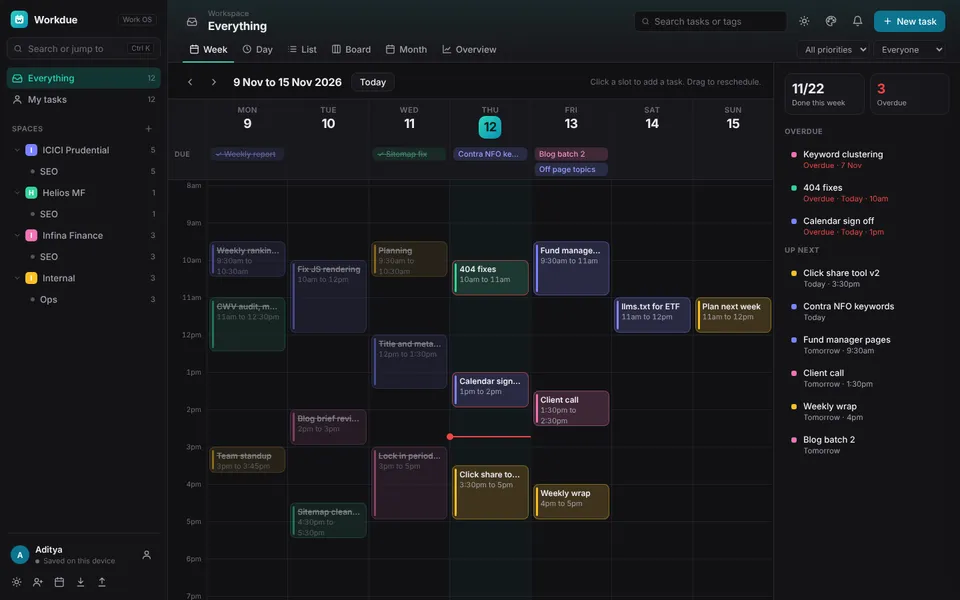
Your whole week as time blocks
Tasks with a due time become blocks sized by their duration. Tasks with only a date sit in the Due row. A now line tracks the current time and the Up next panel shows overdue work.
- Click any empty slot to create a task at that time
- Drag blocks to another hour or day, snapping to 15 minutes
- Overlapping tasks sit side by side so clashes are obvious
- Day view for focus and for phones
Do anything from one box
Press Ctrl K or Cmd K to create a task, find any task, jump to a client list or run a command. Arrow keys to move, Enter to run, Esc to close.
- Create tasks in the list you are viewing
- Fuzzy search across tasks and lists
- Commands for views, reminders, export and theme
- Single key shortcuts for new task, search and views
Nudged before, not after
Turn on pop up notifications to get a daily summary of what is due and overdue, plus an alert before each due time. Click a notification to open the task.
- Daily summary at a time you choose
- Remind 15 minutes to 2 hours before
- Works on desktop and installed mobile app
- Test button to confirm setup
Every client, instantly recognisable
Create a space per client with lists inside for each type of work. Add the client website and Workdue fetches their logo. Each space has a colour used across the calendar.
- Automatic logo lookup with upload fallback
- Lists for each type of work
- Tags that cut across clients
- Everything and My tasks views
Deadlines next to your meetings
Export open tasks as a standard calendar file with reminders, then import into Outlook or Google Calendar so your office calendar keeps you on track too.
- Timed tasks become events with reminders
- Date only tasks become all day events
- Works with Outlook desktop, web and Google
- Live sync is on the roadmap
Your work, everywhere
Sign in with a username and your workspace syncs to the cloud. A copy stays on your device so Workdue keeps working offline. Install it like a native app on any device.
- Username login, no email needed
- Automatic sync across devices
- Works offline, syncs when back
- Install on Windows, Mac, Android and iPhone
Lighter than project tools. Smarter than a calendar.
| Workdue | Big project tools | Plain calendars | |
|---|---|---|---|
| Calendar first week view with time blocks | – | ||
| Command bar for every action | – | – | |
| Client spaces with automatic logos | – | – | |
| Works offline | – | ||
| Sign up without an email | – | – | |
| Setup time | 2 minutes | Hours | Minutes |
Stop chasing deadlines. Start owning them.
Set up your clients and your week in five minutes. Free while in early access.